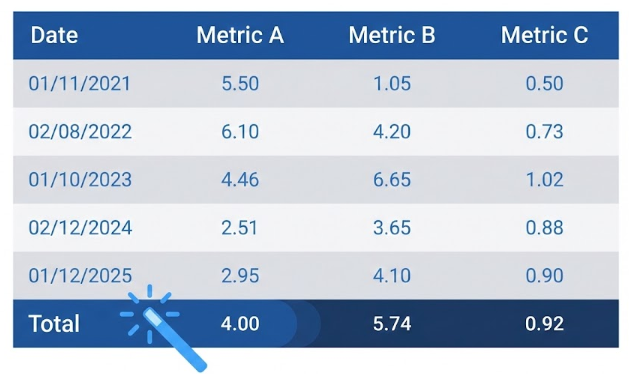
When creating reports with PROC REPORT, adding a summary line (grand total) is a common operation, usually performed via the RBREAK statement.
By default, this summary line adopts a standard style defined by the active ODS template (often a light gray or white background). However, for aesthetic or readability reasons, it is often desired that this total line looks exactly like the header row of the table (same background color, same bold font, same text color).
The natural first reaction is to open the ODS template's source code, identify the hexadecimal color codes for the header (e.g., cx112277 for the text and cxEDF2F9 for the background in the HTMLBlue style), and manually copy them into the statement.
/* À éviter : Code rigide et difficile à maintenir */
rbreak after / summarize style=[fontweight=bold color=cx112277 backgroundcolor=cxEDF2F9];
1
/* À éviter : Code rigide et difficile à maintenir */
2
rbreak after / summarize style=[fontweight=bold color=cx112277 backgroundcolor=cxEDF2F9];
3
Although functional, this method is problematic: if you change the ODS style (e.g., from HTMLBlue to Plateau), your total line will not adapt and will retain the old colors, creating an inconsistent design.
There are two simple ways to apply this style to your summary line.
Method 1: Local Application on the RBREAK Statement
This is the most precise method if you wish to target only the grand total generated by RBREAK.
proc report data=sashelp.class;
columns sex weight;
define sex / group;
define weight / analysis mean f=5.2;
/* On applique directement le style 'Header' à la ligne de résumé */
rbreak after / summarize style=Header;
run;
1
PROC REPORTDATA=sashelp.class;
2
columns sex weight;
3
define sex / group;
4
define weight / analysis mean f=5.2;
5
6
/* On applique directement le style 'Header' à la ligne de résumé */
7
rbreak after / summarize style=Header;
8
RUN;
Method 2: Global Application via the STYLE Option
You can also define this behavior at the level of the PROC REPORT statement itself. This instructs the procedure to use the "Header" style for any element of type "summary".
proc report data=sashelp.class style(summary)=Header;
columns sex weight;
define sex / group;
define weight / analysis mean f=5.2;
rbreak after / summarize;
run;
The codes and examples provided on WeAreCAS.eu are for educational purposes. It is imperative not to blindly copy-paste them into your production environments. The best approach is to understand the logic before applying it. We strongly recommend testing these scripts in a test environment (Sandbox/Dev). WeAreCAS accepts no responsibility for any impact or data loss on your systems.
SAS and all other SAS Institute Inc. product or service names are registered trademarks or trademarks of SAS Institute Inc. in the USA and other countries. ® indicates USA registration. WeAreCAS is an independent community site and is not affiliated with SAS Institute Inc.
This site uses technical and analytical cookies to improve your experience.
Read more.