Promoting CAS Tables: Understanding Scope and Avoiding the "Table not found" Error
Simon 365 views
Difficulty Level
Débutant
Published on :
Expert Advice
Stéphanie
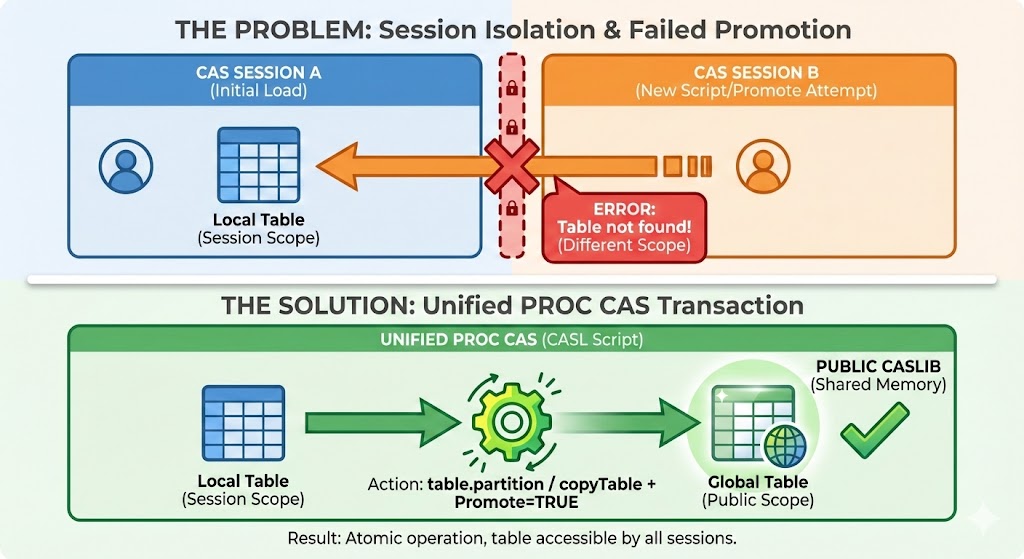
The 'Table not found' error is rarely a system bug, but rather a misunderstanding of session isolation: remember that a new session cannot access data loaded in a previous one. To bulletproof your workflows, switch from sequential steps to a single PROC CAS block. This treats data loading and promotion as one atomic transaction, ensuring your execution context remains consistent throughout the process
Why does it crash?
The cas MySession; statement often starts a new session (Session B). Session B is completely isolated from Session A. It cannot "see" MyTable which is in the memory of Session A. For promote, the table simply does not exist.
Rather than using PROC CASUTIL sequentially (which can hide session changes), the recommended approach by experts (like SASJedi) is to use a PROC CAS block. This allows managing the deletion of the old global version and the promotion of the new one in a single logical transaction.
Furthermore, depending on your Viya™ version, the action to use differs slightly to copy and promote a table simultaneously (for example, to rename it in the process).
Note : The Universal Code
Here is the optimized script that handles cleanup and promotion, taking your Viya™ version into account.
proc cas;
/* 1. Nettoyage : On supprime l'ancienne version globale si elle existe */
/* L'option quiet=TRUE évite une erreur si la table n'existe pas encore */
table.dropTable /
caslib="Public"
name="GL_PERIODS_Global" /* Nom final de la table publique */
quiet=TRUE;
/* 2. Promotion : Copie de la table de session vers une table globale */
/* --- Option A : Pour Viya 3.4 et 3.5 --- */
/* On utilise table.partition comme astuce pour copier + promouvoir */
table.partition /
table={caslib="Public", name="GL_PERIODS_Local"} /* Table source (session) */
casout={caslib="Public", name="GL_PERIODS_Global", promote=TRUE};
/* --- Option B : Pour Viya 2020.1 (Viya 4) et plus récents --- */
/* L'action copyTable est plus explicite et recommandée */
/*
table.copyTable /
table={caslib="Public", name="GL_PERIODS_Local"}
casout={caslib="Public", name="GL_PERIODS_Global", promote=TRUE};
*/
quit;
1
PROC CAS;
2
/* 1. Nettoyage : On supprime l'ancienne version globale si elle existe */
3
/* L'option quiet=TRUE évite une erreur si la table n'existe pas encore */
4
TABLE.dropTable /
5
caslib="Public"
6
name="GL_PERIODS_Global"/* Nom final de la table publique */
7
quiet=TRUE;
8
9
/* 2. Promotion : Copie de la table de session vers une table globale */
10
11
/* --- Option A : Pour Viya 3.4 et 3.5 --- */
12
/* On utilise table.partition comme astuce pour copier + promouvoir */
Why does this method work better?
Atomicity: Everything happens within the same procedure.
Renaming: Unlike a simple promote, this method (partition or copyTable) creates a new physical copy. This allows you to keep your working table (_Local) intact while publishing a clean version (_Global).
Version Management: In Viya™ 3.5, the table.partition action was often used in a diverted way from its primary function to perform this efficient copy-promotion.
3 Best Practices to Remember
One script, one session: Ensure that data loading (Load) and promotion (Promote) occur in the same execution flow or the same CAS session.
Check for existence: Before promoting, make sure your source table is in memory ("Loaded"). If your session has timed out, the table has disappeared from RAM.
Connect by UUID: If you absolutely need to retrieve a table left in an orphaned session, you must reconnect to that specific session using its UUID:
cas mysess uuid="ca683ddf-fe18-3c48-a04e-45718220976d";
Important Disclaimer
The codes and examples provided on WeAreCAS.eu are for educational purposes. It is imperative not to blindly copy-paste them into your production environments. The best approach is to understand the logic before applying it. We strongly recommend testing these scripts in a test environment (Sandbox/Dev). WeAreCAS accepts no responsibility for any impact or data loss on your systems.
SAS and all other SAS Institute Inc. product or service names are registered trademarks or trademarks of SAS Institute Inc. in the USA and other countries. ® indicates USA registration. WeAreCAS is an independent community site and is not affiliated with SAS Institute Inc.
This site uses technical and analytical cookies to improve your experience.
Read more.